Trading Bot
Sep 22, 2026
How to Set Up Your FOMO Family Meme Coin Trading Profile on Your Phone
Learn how to set up your FOMO Family meme coin trading profile on your phone, use Apple Pay, follow traders, explore Clans, copy trades, and find trends.

If you want to learn how to set up your FOMO Family meme coin trading profile directly from your phone, this guide walks through the process from creating your account to customizing your social trading experience.
FOMO is designed to make crypto trading feel simpler and more social. Instead of requiring beginners to start with complicated wallet setups and multiple trading platforms, the app combines meme coin discovery, social feeds, trader profiles, leaderboards, alerts, token research, trading, portfolio tracking, and more in one mobile experience.
Apple Pay is also available as a funding option for eligible users, making it possible to get money into the platform without first navigating a traditional crypto transfer. FOMO also supports following traders, copy-trading-style workflows, trade theses, Clans, trending tokens, and multichain trading.
This guide explains FOMO Family meme coin trading in a beginner-friendly way and shows how to build a profile that is useful for discovering trends and following crypto traders from your phone.
Important: Meme coins and other crypto assets are highly volatile and speculative. This article is for informational and educational purposes only and is not financial or investment advice.

What Is FOMO Family Meme Coin Trading?
FOMO is a social crypto trading app built around discovering tokens and seeing what other traders are doing.
The platform combines trading with a social layer. Instead of simply opening a chart and deciding what to buy, you can browse a feed, look at trader profiles, follow accounts, see leaderboards, receive trade notifications, explore trending tokens, and read trade theses.
For someone interested in FOMO Family meme coin trading, the basic idea is:
The interface is aimed at making the process understandable for people who may not want to deal with a complicated crypto trading terminal.

How to Set Up Your FOMO Trading Profile
Setting up a FOMO profile from your phone is designed to be quick.
1. Download the Official FOMO App
Start by downloading fomo - never miss out from the Apple App Store.
The current App Store listing identifies the developer as fomo labs, inc. and describes the product as a cross-chain crypto trading app supporting assets across several networks.
When downloading the app, make sure you are using the official listing rather than an unrelated application with a similar name.

2. Create Your FOMO Account
FOMO supports account creation using email or Apple ID.
Its official copy-trading guide says onboarding can be completed quickly without requiring a complicated wallet setup first.
For a new user, the process is essentially:
Open FOMO → Sign up → Choose email or Apple ID → Create your account
Once your account is ready, you can start building your FOMO profile.
Your profile becomes the identity you use across the social side of the platform.
3. Set Up Your Profile for Social Trading
FOMO isn't only about buying and selling tokens.
Your profile is part of the social trading experience.
The platform has expanded profile pages and social features so users can discover traders, follow accounts, interact with trade activity, and build a personalized feed. FOMO Web also introduced more detailed profile pages as part of its larger social experience.
A useful FOMO profile should make it easy for you to participate in the community without sharing information you don't want public.
Think of your profile as your home base for:
Following traders
Viewing trading activity
Participating in social features
Tracking your own trading activity
Joining communities
Discovering meme coin trends
4. Secure Your FOMO Account
Before you start trading, security should be one of the first things you think about.
FOMO introduced biometric security features that allow users to protect access to the app using fingerprint authentication or Face ID, depending on the device.
If biometric security is available on your device, enabling it can add an additional layer of protection when opening the application.
You should also protect the email or Apple account associated with your FOMO profile.
Avoid sharing:
Login information
Authentication codes
Private wallet information
Recovery information
Sensitive account details
5. Add Money to Your FOMO Account
Once your profile is ready, the next step is funding.
FOMO supports several funding methods, including:
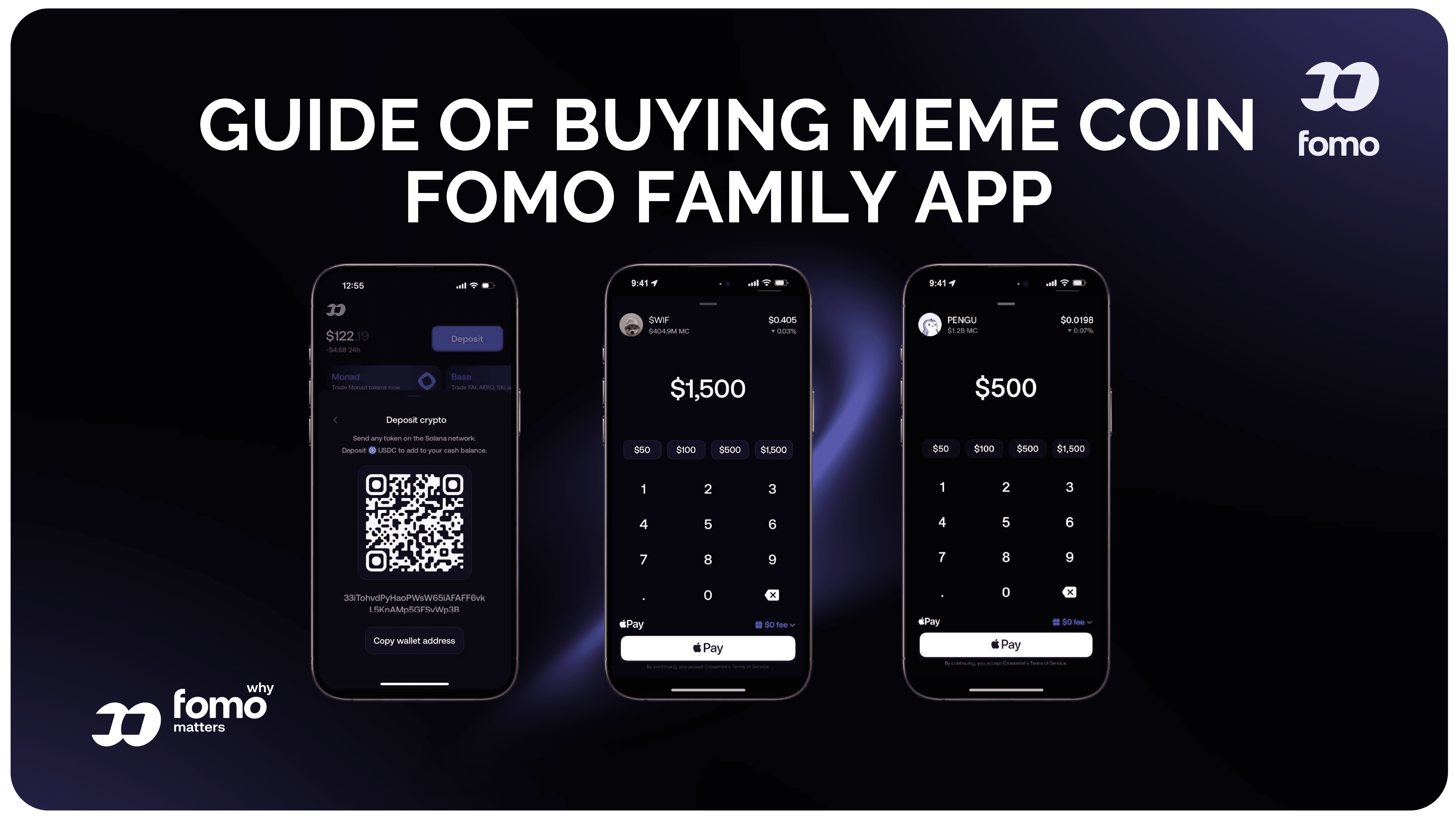
Apple Pay
Debit cards
Crypto transfers
Its official materials specifically highlight Apple Pay as a way to fund the account directly through the app.
For many beginners, this is one of the easiest parts of the FOMO experience.
How Apple Pay Works on FOMO
The basic process is:
Open FOMO → Add funds → Select Apple Pay → Confirm → Start trading
Depending on availability, Apple Pay can use Face ID or Touch ID for confirmation.
Payment and funding availability can vary by location, account, provider, and current platform rules, so always check what is offered inside your own app.

Why Apple Pay Makes FOMO Beginner-Friendly
Crypto can involve a lot of unfamiliar steps.
Someone who has never used a crypto wallet may wonder:
Where do I buy crypto?
How do I transfer it?
Which network should I use?
Do I need SOL or another gas token?
How do I connect a wallet?
Where do I find the right token?
FOMO attempts to reduce some of this friction.
Its official educational material describes Apple Pay funding as a way to get users from their phone into crypto without requiring a separate exchange account for the initial funding process.
That makes Apple Pay particularly relevant to the FOMO Family meme coin trading experience.
6. Explore the FOMO Social Feed
After setting up your account, spend some time exploring the social feed before buying anything.
The feed is one of FOMO's defining features.
The company redesigned the feed to make trading activity easier to scan and added broader trade-thesis visibility, allowing users to see and interact with posts explaining why traders entered particular positions.
You may see:
Traders buying tokens
Traders selling tokens
Meme coin activity
Trending assets
Trade theses
Comments
Social interactions
People you follow
Popular trading activity
The idea is to turn market discovery into something more social and easier to understand.
7. Follow Traders You Want to Watch
Following traders is an important part of setting up your FOMO experience.
Instead of having the same feed as everyone else, you can build a personalized list of accounts you want to monitor.
FOMO's copy-trading guide describes a workflow where users discover traders, follow them, receive notifications when they make moves, and then decide whether they want to execute similar trades.
You might follow traders based on:
Meme coin activity
Solana trading
Specific crypto narratives
Trading style
Consistency
Community participation
Your own research
Following someone doesn't mean you have to copy them.
It simply gives you another source of information.
8. Understand FOMO Copy Trading
Copy trading is another major part of the FOMO social experience.
FOMO describes copy trading as a process where you can follow traders, receive notifications about their activity, and decide whether to make a similar trade yourself.
The important distinction is that you should not think of following someone as handing over your trading decisions.
Discover → Follow → Get notified → Research → Decide → Trade
This can be useful for someone learning how experienced traders approach meme coins.
You can observe:
What they buy
When they buy
When they sell
Which narratives they follow
How their positions perform
How they explain their trades
FOMO's educational content also points out that copy trading carries real risks and does not guarantee profits.
9. Check FOMO Leaderboards
Leaderboards give you another way to discover traders.
FOMO highlights trader rankings as part of its social experience, with performance information available across different time periods.
You can use leaderboards to discover accounts that you may want to research further.
But don't assume that a trader at the top of a leaderboard will remain there.
Crypto performance can change quickly, particularly in meme coin markets.
A leaderboard should be treated as a discovery tool rather than a guarantee of future performance.
10. Turn on Useful Trading Notifications
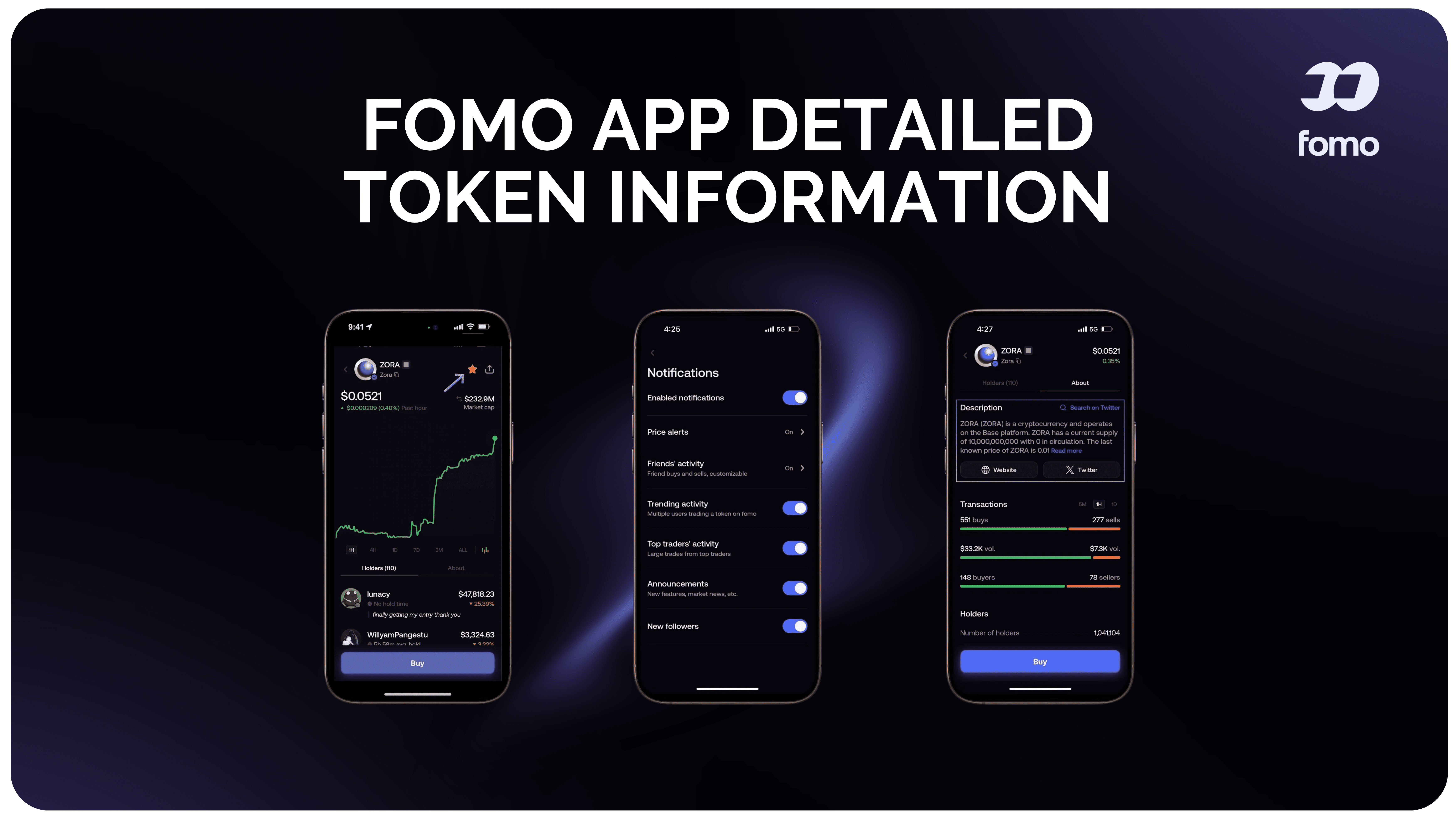
Notifications can be useful if you are following several traders.
FOMO's social trading system can notify users when traders they follow make moves.
You can use notifications to stay informed about:
Trader purchases
Trader sales
Social activity
Market movements
Tokens you are watching
Avoid turning every possible notification on if it becomes overwhelming.
The goal is to create a feed that helps you discover information without encouraging constant impulsive trading.
11. Explore Trending Meme Coins
After setting up your social feed, explore the trending-token sections.
FOMO's platform is built around early token discovery and trending assets, with its current product highlighting trending tokens and real-time market activity.
This can be particularly useful for FOMO Family meme coin trading because meme coin narratives can change quickly.
You might see a token gaining attention because:
Trading volume is increasing
More traders are buying it
A social narrative is spreading
The token is appearing in multiple feeds
A particular trader or group is discussing it
But remember:
Trending does not mean guaranteed.
A popular meme coin can still lose most or all of its value.
12. Read Trade Theses Before Copying a Trade
One of FOMO's more interesting social features is the trade thesis.
A trader can explain why they bought or sold a token.
FOMO expanded this feature from individual token feeds into the broader social feed in February 2026. The platform says theses can be viewed and interacted with, alongside information such as trader P&L and balance.
This adds context.
Instead of seeing:
“Trader bought this coin.”
you may be able to see:
“Trader bought this coin because they believe this particular narrative or setup could develop.”
You can then decide whether the reasoning makes sense to you.
13. Join FOMO Clans
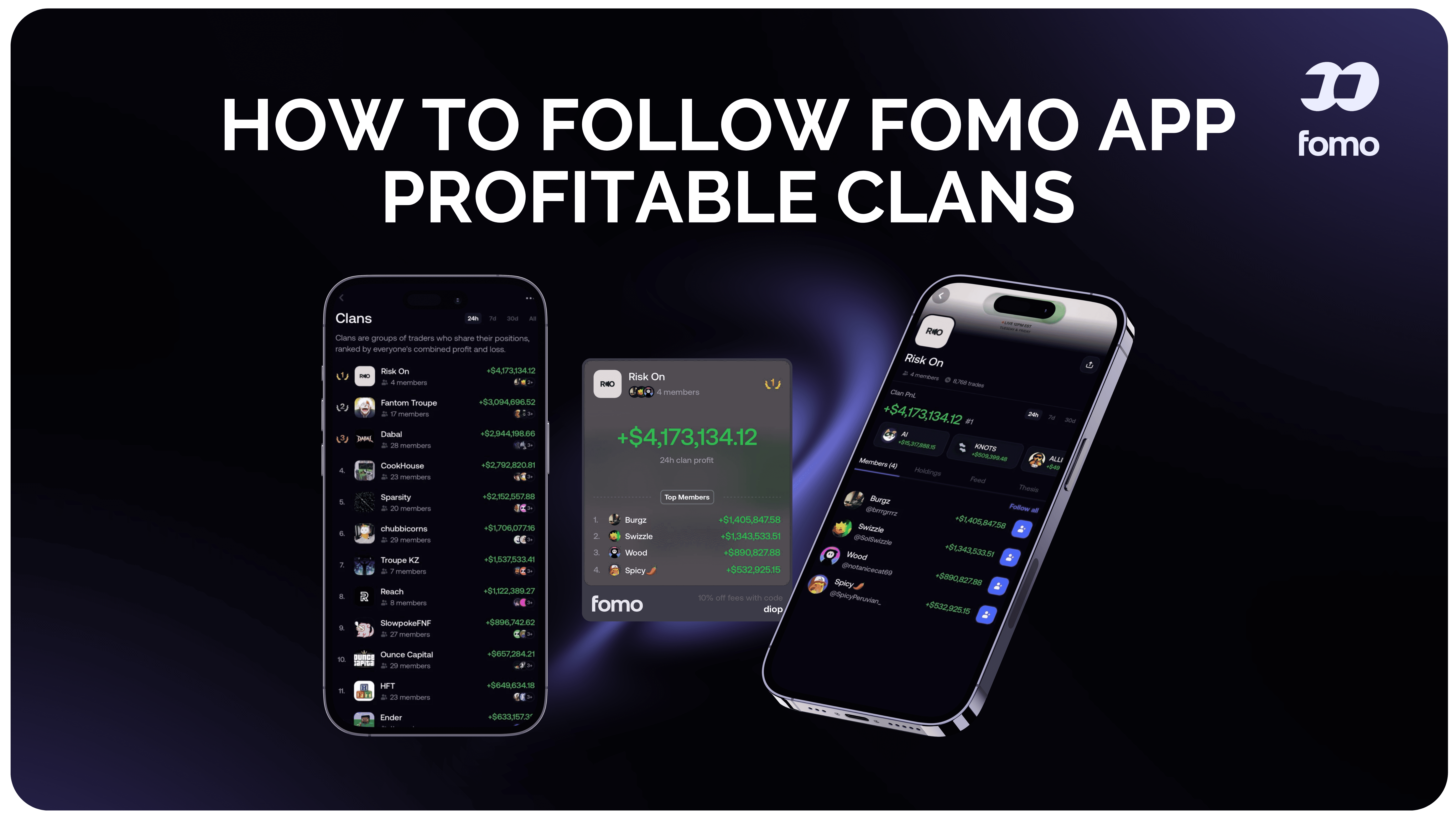
FOMO has also developed a community layer around Clans.
Clans are designed to bring groups of traders together around the social experience.
This fits the broader direction of FOMO: the platform isn't just a place to execute trades; it is also designed around communities, traders, trends, and shared market activity.
If Clans are available to you, they can become another way to:
Discover traders
Follow community activity
Participate in group discussions
Compare activity
Find emerging narratives
Stay connected with other traders
For people who enjoy the social side of crypto, this can make the FOMO experience more community-driven.
14. Build Your Own Meme Coin Trading Feed
Once you follow traders, explore tokens, and interact with social features, your FOMO experience becomes more personalized.
A simple setup could be:
Follow a few traders
Choose accounts you genuinely want to study.
Follow different trading styles
Don't build your entire feed around one person.
Watch several meme coin narratives
This helps prevent tunnel vision.
Use notifications selectively
Keep important trade activity visible without creating unnecessary noise.
Explore Clans
Use communities to discover new ideas and traders.
Read trade theses
Look for reasoning rather than simply following transactions.
The goal is to make your FOMO feed useful rather than simply busy.
15. Use FOMO for Multichain Meme Coin Trading
FOMO has expanded beyond a single blockchain.
The current App Store listing says users can trade across Solana, Robinhood Chain, BNB Chain, Base, Ethereum, and Monad.
FOMO's web launch also described cross-chain swaps across Solana, Base, BNB Chain, and Monad using a unified USD balance without manually bridging between those chains.
For beginners, this matters because blockchain networks can be confusing.
Instead of constantly thinking about which network holds your funds, the platform is designed to simplify the trading experience.
Supported networks and features can change, so check the current app before trading.
16. Use One Account Across Mobile and Web
Although this guide focuses on setting up your FOMO profile on a phone, you are not necessarily limited to mobile.
FOMO launched a web version in April 2026.
The company says the same identity, balance, positions, following, and notification settings can carry between mobile and web.
That means you can:
This can be useful if you want to switch to a larger screen for research or chart analysis.
17. Use TradingView Charts for Deeper Research
FOMO partnered with TradingView to bring professional charting tools into FOMO Web.
The integration includes technical indicators and drawing tools directly on token pages.
For a beginner, you don't need to learn every technical indicator immediately.
Start with basic information such as:
Price
Volume
Timeframes
Recent highs
Recent lows
General price trend
As you gain experience, you can explore more advanced charting tools.
18. Track Your Meme Coin Portfolio
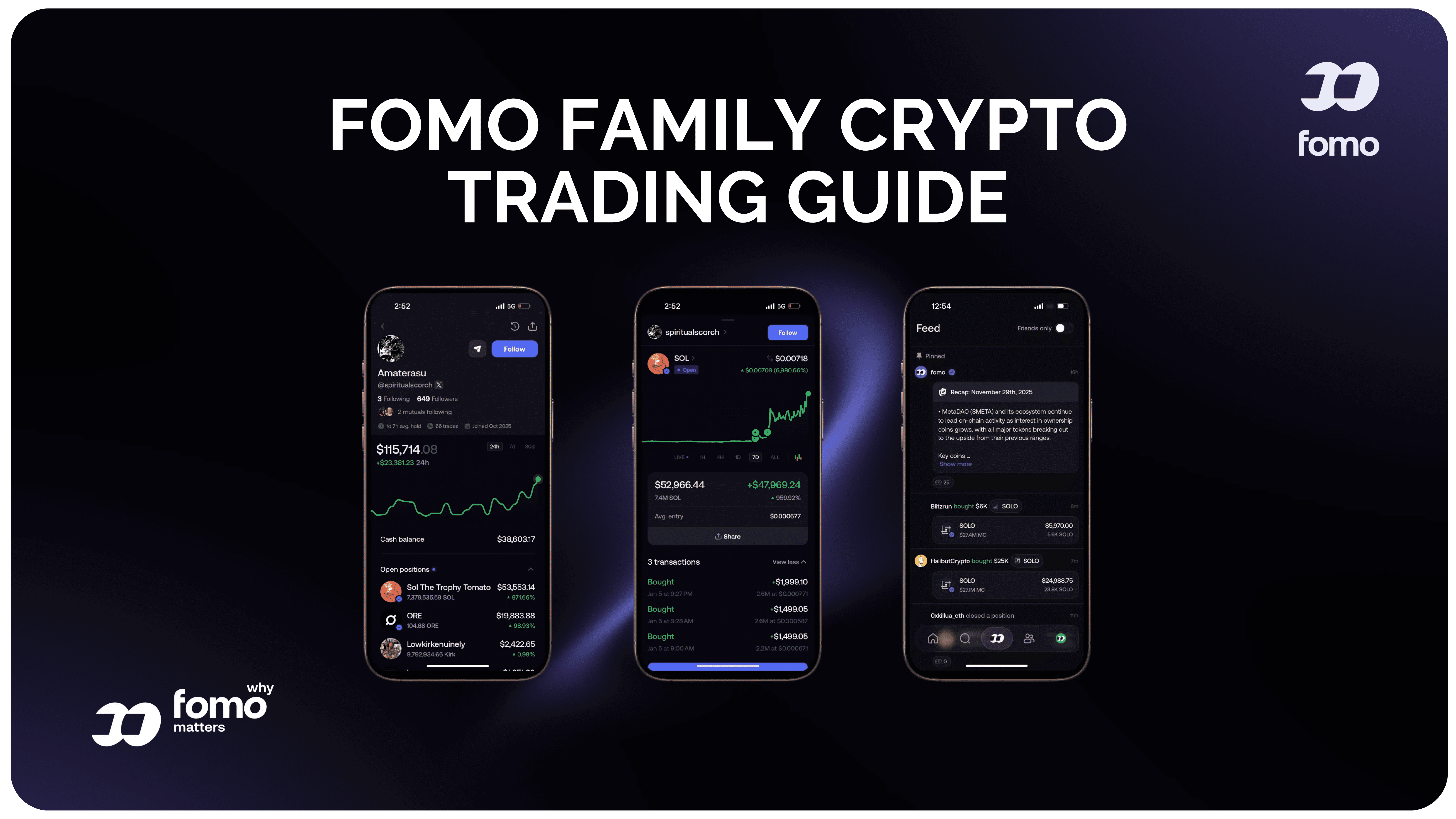
After buying tokens, your FOMO profile becomes connected to your portfolio activity.
The App Store listing highlights cross-chain portfolio tracking, real-time P&L visualization, and transaction and trade history.
This gives you a central place to monitor:
Current holdings
Portfolio value
Profit and loss
Previous trades
Transactions
Activity across supported networks
Keeping track of your trading history is especially useful when you want to understand your own habits.
19. Review Your Trading History
Don't only look at your current balance.
Your previous trades can tell you a lot about how you actually trade.
Look for patterns such as:
Buying after large price increases
Selling too early
Holding losing trades too long
Trading too frequently
Following too many social signals
Taking oversized positions
Entering because of social hype
FOMO provides transaction and trade history as part of its portfolio experience.
Use that history as a record for learning rather than simply checking whether you made money.
20. Use FOMO's Gasless Trading Features
FOMO also promotes gasless trading as part of its simplified experience.
The company's educational material describes FOMO as sponsoring gas fees in certain parts of its trading experience, reducing one of the technical details users otherwise have to manage.
This can make the app easier for beginners who are unfamiliar with blockchain gas mechanics.
However, always review the transaction details and current fees shown inside the app before confirming a trade.
21. Understand Quick Buys
FOMO includes quick-buy functionality for faster token execution.
Its web launch describes quick buys as a way to enter tokens faster, while the broader product emphasizes simple, one-click-style trading.
This is convenient, especially when you already know what you want to trade.
But convenience can also encourage impulsive decisions.
Before using a quick-buy button, know:
What am I buying?
Why am I buying it?
How much am I risking?
What would make me sell?
Those questions are more important than how quickly the transaction executes.
22. Explore FOMO's Tax Tools
FOMO has also added a third-party tax reporting integration through Awaken.
Its January 2026 product update says users can access tax settings from the app and connect their trading history with Awaken for reporting purposes.
This can be useful if you become an active trader and need to organize your transaction history.
Tax rules vary significantly by country and individual circumstances, so don't assume the app's tax tools replace professional tax advice.
23. What About FOMO Perpetuals?
FOMO has expanded beyond spot crypto trading with perpetual markets.
The company announced perpetual trading in June 2026, powered by third-party protocols including Hyperliquid and Trade[XYZ]. The offering includes crypto, equity, index, commodity, and pre-IPO perpetual markets, subject to availability and geographic restrictions.
These products are more advanced than simply buying a meme coin.
If your goal is learning FOMO Family meme coin trading, you can focus on the basic spot-trading and social features first.
There is no need to use every feature immediately.
A Simple FOMO Family Meme Coin Trading Profile Setup
If you want a simple beginner setup, follow this checklist:
Account
Funding
Social
Research
Trading
Portfolio
FOMO Family Meme Coin Trading: How to Make Your Profile More Useful
Your FOMO profile doesn't need to follow every trend.
A better approach is to build a focused social environment.
For example, you could follow:
3–5 traders you genuinely want to study.
Then add:
2–3 meme coin narratives you understand.
Then use:
Trade theses + charts + token data
to research the trades appearing in your feed.
This keeps the social experience useful without turning your phone into a constant stream of trading signals.
Should Beginners Copy Every FOMO Trader?
No.
The purpose of following traders is to gather information and learn how other market participants behave.
FOMO's own educational material explains that copy trading can involve following traders, receiving notifications, and choosing whether to replicate their trades. It also discusses the risks involved.
A trader may have:
More capital
Different risk tolerance
More experience
A different time horizon
Better market information
A completely different strategy
So a trade that makes sense for one person may not make sense for another.
Use social trading as a research tool, not a replacement for your own judgment.
Why FOMO Is Designed to Feel Easy
FOMO's product direction is centered around making crypto trading more accessible.
Its own description emphasizes features such as seamless onboarding, Apple Pay buying, early token discovery, sponsored gas fees, social trader tracking, and access to multiple chains from one account.
That makes the platform less focused on presenting itself as an intimidating professional terminal and more focused on:
People → Trends → Discovery → Social activity → Simple trading
The more advanced tools are still there, including TradingView charts, multichain functionality, portfolio analytics, and perpetuals.
But a beginner can start with the simpler parts and learn the rest over time.
FOMO Family Meme Coin Trading From Your Phone: Complete Workflow
Here is the complete process in one place:
Step 2: Create your profile with email or Apple ID.
Step 3: Secure your account with available biometric protection.
Step 4: Add funds through an available method such as Apple Pay, debit card, or crypto.
Step 6: Follow traders you want to monitor.
Step 7: Explore the leaderboard.
Step 8: Look at trending meme coins.
Step 10: Explore Clans and social communities.
Step 11: Open a token and research it.
Step 12: Review the chart and market information.
Step 13: Decide whether the trade fits your own plan.
Step 14: Use the buy function if you decide to trade.
Step 15: Monitor your portfolio and P&L.
Step 16: Review your trading history over time.
This is the basic FOMO Family meme coin trading workflow from a smartphone.
Final Thoughts
Setting up a FOMO Family meme coin trading profile is more than simply creating an account and depositing money.
The platform is built around a social approach to crypto, so your experience can become personalized around the traders, tokens, narratives, and communities you choose to follow.
You can use Apple Pay to fund your account when available, discover trending meme coins, follow traders, receive activity notifications, explore leaderboards, read trade theses, participate in Clans, and monitor your portfolio from your phone.
FOMO has also expanded into multichain trading, web access, TradingView charting, tax tools, and perpetual markets, giving experienced users additional tools without removing the simpler mobile experience.
For beginners, however, the best way to approach FOMO is to start with the basics.
Set up your profile. Follow a few traders. Watch the trends. Research tokens. Learn from trade theses. Use Apple Pay if it suits you. Explore Clans. Then make your own trading decisions.
The app can make the process easier to navigate, but meme coin trading itself remains highly speculative and can result in substantial losses.
Disclaimer
This content is provided for informational and educational purposes only and does not constitute financial, investment, trading, legal, tax, or other professional advice. Nothing in this article should be considered a recommendation or solicitation to buy, sell, hold, or trade any cryptocurrency, token, or financial product.
Cryptocurrency and digital asset trading involve significant risks, including extreme price volatility, loss of capital, liquidity risks, scams, and the possibility of losing some or all of your investment. Past performance is not indicative of future results.
Any platforms, products, projects, tokens, traders, or services mentioned in this article are discussed for informational purposes only. Features, fees, availability, terms, and supported assets may change at any time. Always conduct your own research and verify information directly with the relevant platform or project's official sources before making any financial decision.
You should never invest or trade money you cannot afford to lose. Consider your own financial circumstances and risk tolerance, and consult a qualified financial, legal, or tax professional if you require personalized advice.
Nothing on this website guarantees profits or future results. You are solely responsible for your own financial and trading decisions.